The Esketit FAQ Handbook
- September 9, 2026

Navigating a P2P platform should be as easy as checking your phone in the morning. At Esketit, we operate as a P2P marketplace platform that connects Users seeking asset growth with global lending companies looking for diversified funding channels.
As with anything that requires setting up a profile or tweaking settings, questions pop up, and to help you navigate the platform, we’ve put together this manual. It covers basic User Profile navigation and includes answers to the most frequent queries sent to our support team – adding a bank account or payment institution account to your User Profile, changing your contact details, updating ID document and address information and disabling or re-enabling 2FA. In case you have questions regarding any of these, it is a good idea to start here.
Navigating Your User Profile
Here is a quick run-through of how to manage your capital on Esketit — where to find your essential tools and details:
Where to Find Claims Available for Purchase
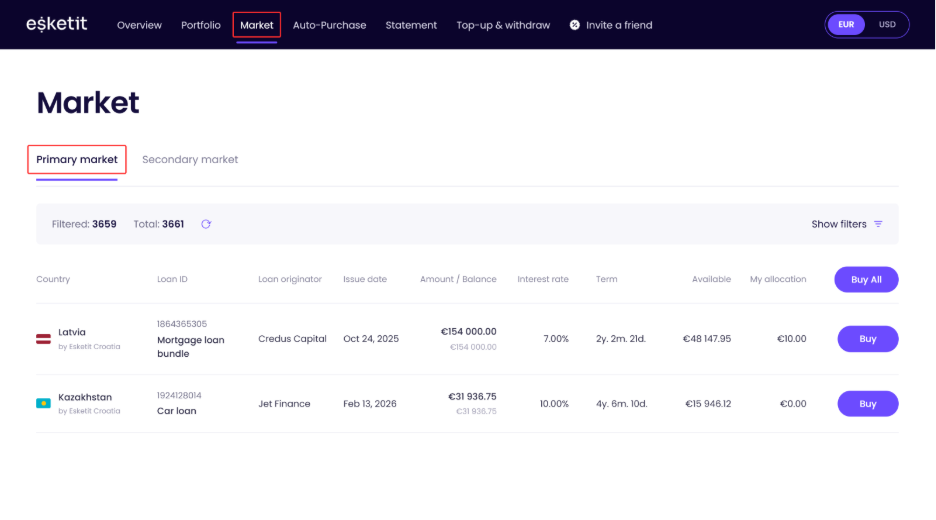
If you prefer building your portfolio by hand, head to the Market tab in the main menu. This tab lists all live Primary and Secondary market claims from our global lenders. You can filter these assets by loan type, country, lender, status, extension availability, interest rate, remaining term, and available amount to match your preference, if any.
How to Configure and Activate Strategies
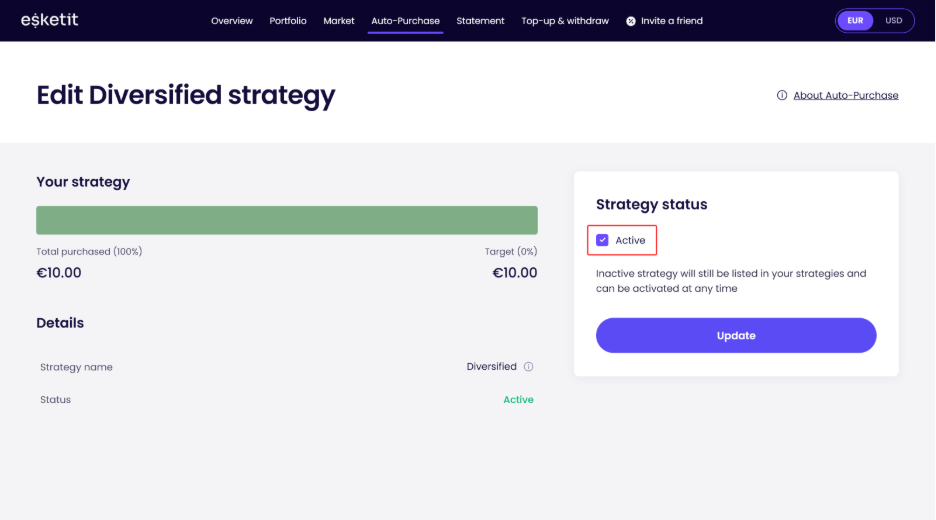
To let the platform handle claim selection automatically, navigate to the Auto-Purchase tab.
- Diversified Strategy: Select this strategy to automatically spread your funds across all available lenders.
- Custom Strategy: Build your own criteria rules from scratch. To do so, click Add custom strategy and fill in your criteria.
Activating: To turn your desired strategy on, click on Edit next to the strategy name, tick the Active box, allocate a specific budget to it and click Update. The system will then handle all incoming allocations on your behalf.
How to Top up and Withdraw Funds
Moving funds to and from your Esketit User Profile is straightforward. Click on the Top-up & withdraw tab in your User Profile menu.
- To top up: Currently you can only top-up to the Esketit Croatia entity, so make sure you are in that entity view. In the Instant top-up section, you can transfer funds from a bank account or payment institution account already registered in your name. Simply enter the desired sum (€10 minimum) and click Top-up. Alternatively, you can use the Manual top-up via bank transfer section to copy your bank details and make a standard SEPA transfer from your personal bank account or payment institution account. Important(!): remember to include your unique user reference number with the prefix “INV-” (e.g., INV-010101) in the payment details so our system can route the money to your Esketit User Profile. Also, you can only transfer EUR currency, other currencies will be rejected. The manual transfer can take up to 2 business days to complete.
- To withdraw: Follow the steps below.
- Head to the Withdrawals section on the same page, enter your desired withdrawal amount, select your verified bank account or payment institution account, and click Withdraw.
- You will receive a verification code via email. Open the verification email, click the link, and enter the provided code to confirm the withdrawal. A withdrawal can take up to 2 business days to complete.
- If you don’t receive a verification email, you can request a resend.
- If you’re still having trouble receiving the code, contact Esketit support at [email protected].
How-Tos for Frequently Asked Questions
Sorting out User Profile updates doesn’t have to feel like a chore, and we try to make it as easy and fluent as possible. Below, you will find quick guidelines to help you handle your most common technical and User Profile updates in no time.
How do I add a new bank account or payment institution account to my User Profile?
To link a new bank account or payment institution account for future withdrawals, the process depends on which platform entity you are using:
- For the Ireland Account: send a digital confirmation of your new bank account or payment institution account in PDF format to our support team at [email protected]. This document must explicitly show your full name, the bank or payment provider’s name, and your IBAN number.
- For the Croatia Account: first, log into your profile, navigate to the Top-up & withdraw page, and switch to the Esketit Croatia banking details. Make a small incoming transfer of €0.01 from your new bank account or payment institution account into your Esketit User Profile to verify it. Once completed, send our support team ([email protected]) a proof of payment PDF containing your full name, the bank name, the transferred amount, transfer date, and your IBAN.
What happens to my Ireland portfolio after the transition to the Croatia entity?
When we launched Esketit Croatia, the automated strategy cash-out features and the secondary market functionality for the older Esketit Ireland entity were disabled.
You do not need to take any action for your existing portfolio. Your active Ireland claims will continue to be repaid as borrowers make payments, as lenders issue repurchases, or as the assets reach maturity.
By default, these repayments are credited to your Esketit Ireland balance. If you hold a verified Esketit Croatia profile, you can submit a Repayment diversion, after which eligible repayments will be paid directly to Esketit Croatia and credited to your Croatia balance.
Any funds already sitting in your Ireland balance are not covered by the Repayment diversion. These must be withdrawn manually to your bank account or payment institution account and then transferred back using Esketit Croatia banking details.
How do I change my registered email address or phone number?
Updates to your contact details require manual verification. Please submit the following items to our support team at [email protected]:
- A photo of your official identity document (Passport or ID card) used during registration.
- *A selfie of you holding that exact identity document next to your face.
- Details of your most recent Esketit User Profile transactions (your latest added funds or withdrawals).
- Both your old and your newly requested phone number or email address.
How do I upload a new ID document if my current one has expired?
Simply contact our team at [email protected] informing us of the expiration. We will manually reset the identity verification status on your Esketit User Profile. Once reset, you can simply log into your User Profile and complete the standard verification process using your newly issued passport or ID card.
I lost access to my phone and need to turn off Two-Factor Authentication (2FA). What should I do?
If you get locked out of your authenticator app, our team can temporarily reset your 2FA settings so you can log in and reactivate it securely. To request a 2FA reset, please email [email protected] and provide us with:
- A photo of your official identity document (Passport or ID card) used during registration.
- *A selfie of you holding that exact identity document next to your face.
- Details of your most recent Esketit User Profile transactions (your latest added funds or withdrawals).
- Your registered phone number.
*This is required to prevent identity fraud and ensure the person opening or using the User Profile is who they claim to be.
I added funds but the money isn’t showing up in my Available Funds. What happened?
Please note that added funds can sometimes take 2–3 business days to appear in your User Profile, depending on your bank or payment provider.
If your added funds still haven’t arrived after this period, please email us a formal PDF proof of payment from your bank or/ payment provider at [email protected]. Ensure it clearly displays:
- your full name;
- bank or
/payment provider name;
- amount transferred;
- execution date;
- sender IBAN.
Our finance team will trace the funds and credit your balance.
How do I update my residential address?
To update your registered address, please email [email protected] with an official proof of residence document that is less than 3 months old.
Accepted documents:
- Utility bills
- Telephone bills
- Active car insurance policies
- Signed rental agreements
- Municipality tax bills
- Social insurance statements
- Local government registry extracts
Important(!): We cannot accept passports, ID cards, bank statements, or driving licenses as valid proof of address.
And that covers our short handbook. If you have more questions, our support team is always here for you – contact us at [email protected] and we’ll help.